You don’t need a full website redesign to make your site feel more polished and professional. With just a few simple updates you elevate your website and make it feel polished instead of “almost there”.
In this post we cover:
- Update Your Headlines
- Cleaning Up Content
- Creating an Effective CTA (Call-To-Action)
Update Your Headlines
Clarity Beats Clever...Everytime!
Headlines are the first thing that visitors see and it should instantly tell them these three things:
- Who you help
- What you help them do
- Why it matters
Many website headlines use vague, catchy or poetic that sound nice, but don’t relate what they offer. I use to use catchy headlines thinking that if it was “catchy” enough it would get visitors to continue looking at what I had to offer. WRONG!
You have about 10 seconds to catch the attention of a visitor, otherwise they click away to the next link in their search. Those first few words and sentences can be the difference between them staying or leaving.
Instead of this:
“Create a Beautiful Website For Your Business”
I use this:
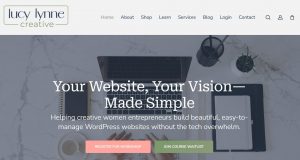
“Helping creative women entrepreneurs build beautiful, easy-to-manage WordPress websites with the tech overwhelm.”
Quick Tip: If someone lands on your site and can’t explain what you do within 5 seconds, your headline needs clarity. Invite others to visit your site and ask them to answer these three questions:
- Who do you think I help/serve? (Who is the audience?)
- What do I help them do?
- Why does it matter?
Clarity Is Key!
Clean Up Your Content
Consistency + Professionalism
One of the biggest giveaways of a DIY website is inconsistent fonts and spacing.
Keep fonts simple:
- Most themes allow for global customizations where you can set the default fonts for headings, content and navigation.
- If you do change the font on the individual pages make it a general practice that you only change the size of the font or perhaps swap the Heading font with your general text font.
- It is a good practice to limit your fonts to no more than three styles for your site. Choose one font style for headings, another for content and maybe one for navigation. Simplicity is the best way to increase the readability of your site.
Use consistent spacing between sections/containers:
- Most themes allow for global customization to have a default page layout that includes margins, paddings and gaps for the sections/containers of your page.
- If you do change the spacing on the page make sure that you balance the page with consistent spacing.
- Overcrowding a page with images and content makes the page feel overwhelming, crowded and not appealing to the eye. Your page should have plenty of “white space” for the eye to rest when viewing the page.
Quick Tip: Scroll through your website and ask:
- Are the headings the same on all the pages?
- Does the page appear balanced with spacing or does it feel crowded?
- Is the text easy to read and/or the correct size for mobile, tablet and desktop
You don’t need fancy typography or layouts.
Clean and readable always wins over beauty!
Add or Improve your CTA
Tell People What You Do
A professional website doesn’t just look good…it guides the visitor through a journey to your CTA (Call-To-Action).
Every page should answer the question:
“What is the next step?”
Here are a few examples of simple calls to action:
- “Join the Newsletter”
- “Book a Consultation”
- “Register for Workshop”
- “Join Waitlist”
- “View Services”
- “View My Portfolio”
Quick Tip: You don’t need multiple CTAs. Determine your top CTA and make a clear next step to guide the visitor.
If your site has beautiful content and layout, but no clear direction, visitors will leave (bounce) in the first 10 to 30 seconds of landing on your site…even if they love what they see.
Be the Guide!
Final Thoughts
Professional websites are not about being perfect…they are about being clear, consistent and welcoming to the visitor!
If your website currently feels overwhelming or unfinished, start small with these three simple updates.
Want more information on how to clarify your message? Check out “Building a Storybrand” with Donald Miller.
If you’d like guided support instead of guessing, that’s exactly what I help women entrepreneurs in the creative and service industries do inside the Website Foundations course. In addition, I offer consultations and mentorship services. Just click the button below to book an appointment or to learn more about the course.